- Before you sign, confirm seven things: a measurable need, compared alternatives, owned security and privacy risks, full first-year and renewal costs, acceptable contract and exit terms, recorded budget and decision authority, and named onboarding and renewal owners.
- Each of the 35 checks below has an owner and an evidence requirement, so a ticked box means a document exists.
- A missing critical check is a hold, and it isn't a promise to fix it later.
- You'll find the decision record and scorecard in the template section, and you can copy them or download them as Word and Excel files.
A SaaS procurement checklist helps you verify the business need, the vendor, security, total cost, contract and approval before you purchase software. This one's got 35 checks in seven stages. Each check names an owner and the evidence that proves it, so a green checkbox means more than "someone looked at it."
This is a pre-purchase checklist, and it isn't a full explanation of how to design a procurement department. For the end-to-end workflow, read our SaaS procurement process guide. For the broader operating model, see SaaS procurement. You can copy this page into a request record, a spreadsheet or an approval system and use it right away.
What should a SaaS procurement checklist include?
A practical checklist covers seven stages: intake, alternatives, security, commercial evaluation, approvals, onboarding and renewal or exit. The order matters because it stops teams from spending hours on legal review for a tool that has no budget or can't meet a required integration.
Use one simple evidence rule: don't count a check as done without proof. A completed check names the person who reviewed it, the document or test used, the date and the decision. A vendor's website can support discovery, but it doesn't replace a signed quote, current security evidence or contract language.
Suggested risk tiers: low risk for a noncritical tool with no sensitive data; medium risk for software connected to business systems; high risk for regulated or sensitive data, privileged access, financial workflows or critical operations. This is an illustrative internal triage method, not an official regulatory classification. Your security and legal teams should set the final thresholds, because they're the ones who answer for the risk.
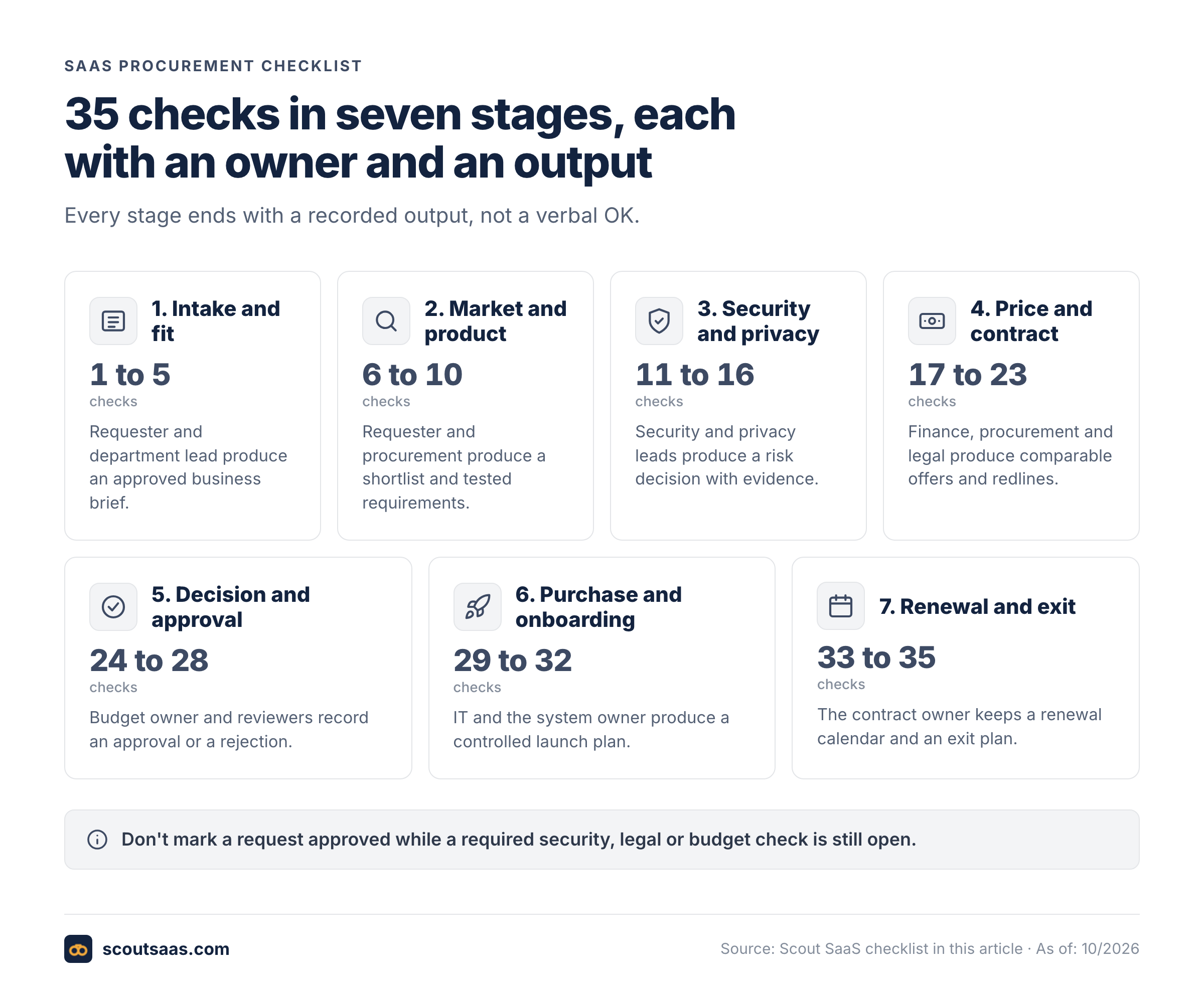
| Stage | Checks | Primary owner | Required output |
|---|---|---|---|
| 1. Intake and fit | 1 to 5 | Requester and department lead | Approved business brief |
| 2. Market and product | 6 to 10 | Requester and procurement | Shortlist and tested requirements |
| 3. Security and privacy | 11 to 16 | Security and privacy leads | Risk decision with evidence |
| 4. Price and contract | 17 to 23 | Finance, procurement and legal | Comparable offers and redlines |
| 5. Decision and approval | 24 to 28 | Budget owner and reviewers | Recorded approval or rejection |
| 6. Purchase and onboarding | 29 to 32 | IT and system owner | Controlled launch plan |
| 7. Renewal and exit | 33 to 35 | Contract owner | Renewal calendar and exit plan |
The 35-point SaaS procurement checklist
The checklist separates what to ask from what proves the answer. The responsible person changes by company, but no check should be ownerless, and you shouldn't tick one without its evidence.
Stage 1: Intake and business need
- 1. Define the problem. Owner: requester. Write the task the team cannot complete today and its impact. Evidence: a short business brief. A product name alone isn't enough.
- 2. Set a measurable outcome. Owner: department lead. Choose one or two results you can observe, such as reducing manual reconciliation steps or meeting a response-time target. Evidence: baseline, target and review date.
- 3. Confirm the users and access levels. Owner: requester and IT. Count full users, occasional users, administrators and external collaborators separately, since they're often priced differently. Evidence: a seat forecast by role.
- 4. Check existing licenses. Owner: IT or SaaS owner. Search your current catalog for a tool that already does the job, because you may already own it. Evidence: existing contract or documented gap.
- 5. Assign a decision deadline and sponsor. Owner: department lead. Record the business owner, target start date and maximum acceptable first-year spend. Evidence: sponsor approval and budget range.
Stage 2: Vendor and product fit
- 6. Write must-have requirements. Owner: requester. Separate mandatory workflows from desirable features. Evidence: ranked requirements with pass or fail criteria.
- 7. Compare realistic alternatives. Owner: procurement. Evaluate more than one viable vendor when time and policy allow, so you're not comparing a vendor with nothing. Evidence: dated shortlist and reasons for exclusion.
- 8. Test a critical workflow. Owner: system owner. Use representative data in a trial or demo, including an error case. Don't test with only the happy path. Evidence: screenshots or test notes with result.
- 9. Verify integrations. Owner: IT. Confirm authentication method, API or connector permissions, data direction and plan restrictions. Evidence: vendor documentation plus a test or technical sign-off.
- 10. Check accessibility and support fit. Owner: operations. Evaluate user needs, support hours, response commitments and administrator effort. Evidence: service description and pilot feedback.
Stage 3: Security, privacy and vendor risk
- 11. Classify the data. Owner: security or privacy lead. Identify personal data, regulated records, customer confidential information and business-critical exports. Evidence: data-flow sketch and classification.
- 12. Review identity controls. Owner: IT security. Check MFA, SAML SSO, provisioning, deprovisioning and administrator roles in the quoted plan. Evidence: product documentation and test result.
- 13. Review independent assurance. Owner: security. Request a current SOC 2 report, ISO certificate or equivalent evidence where relevant. Check scope, period and exceptions, and note what isn't covered. Don't accept a logo in place of a report. Evidence: reviewed report or documented compensating controls.
- 14. Confirm data location and subprocessors. Owner: privacy and legal. Ask where customer data and backups are processed, what subcontractors do and whether cross-border terms are required. If they won't say, that's a finding. Evidence: DPA, subprocessor list and transfer assessment if applicable.
- 15. Check incident and recovery procedures. Owner: security. Ask about incident notice, recovery objectives, backups, vulnerability reporting and data restoration. Evidence: contractual commitment or documented security response.
- 16. Decide residual risk. Owner: security approver. Record remaining concerns, mitigations, responsible owners and whether the purchase can proceed. Nobody should have to guess what's been accepted. Evidence: signed or recorded risk decision.
Stage 4: Commercial terms and contract
- 17. Collect comparable written quotes. Owner: procurement. Request the same seat mix, term and feature scope from each finalist, or you can't compare the offers. Evidence: dated vendor offers.
- 18. Calculate first-year cost. Owner: finance. Include subscription, onboarding, integration, support, one-time fees and expected usage charges. Evidence: cost model and assumptions.
- 19. Model the renewal year. Owner: finance. Identify discounts that expire, true-ups, price caps and automatic increases. Evidence: second-year cost scenario.
- 20. Verify the product entitlement. Owner: procurement. Tie each critical feature to the exact plan and order form. Evidence: SKU or written schedule. A sales slide isn't proof.
- 21. Review payment and taxes. Owner: finance. Confirm billing currency, annual prepayment, payment method, applicable taxes and refund policy. Evidence: commercial schedule.
- 22. Review liability and data terms. Owner: legal. Check confidentiality, intellectual property, warranties, indemnities, limitation of liability and DPA obligations. Evidence: reviewed agreement and redlines.
- 23. Confirm termination and export rights. Owner: legal and IT. Check notice periods, data export format, post-termination retention, deletion and assistance. Evidence: exit clause and export test where possible.
Stage 5: Decision and approval
- 24. Verify budget authority. Owner: finance. Confirm the right cost center and whether the purchase goes over an approval threshold. If it's over, it needs a higher sign-off. Evidence: recorded budget sign-off.
- 25. Record the security decision. Owner: security approver. Mark pass, fail or approved exception with date and scope. Evidence: risk decision record.
- 26. Record legal acceptance. Owner: legal. Confirm that the final order and governing terms match the reviewed version. What's signed must be what was reviewed. Evidence: final agreement reference.
- 27. Select a vendor and explain why. Owner: business sponsor. Document trade-offs against the shortlist. A numerical score alone doesn't explain the choice. Evidence: decision memo and evaluation matrix.
- 28. Obtain authorized approval before signature. Owner: designated signatory. Check approval delegation and the final total commitment. Evidence: approval timestamp and authorized signer.
Stage 6: Purchase and onboarding
- 29. Assign the system owner. Owner: department lead. Name an accountable administrator and a backup who isn't on leave at the same time. Evidence: owner record and escalation contact.
- 30. Configure access before rollout. Owner: IT. Apply SSO/MFA, least-privilege roles and joiner/mover/leaver processes. Evidence: access test and administrator checklist.
- 31. Validate data import and integrations. Owner: IT and requester. Reconcile sample records, error handling and permissions. Evidence: acceptance test and rollback plan.
- 32. Set adoption and service review dates. Owner: business sponsor. Check whether the promised workflow is being used and whether tickets or risks remain. If nobody's using it, find out why. Evidence: 30/60/90-day review schedule.
Stage 7: Renewal and exit
- 33. Capture renewal and notice dates. Owner: contract owner. Record renewal date, cancellation deadline and pricing notice terms. If it isn't in the calendar, it'll be missed. Evidence: calendar entry with responsible owner.
- 34. Define usage and value checks. Owner: finance and system owner. Review seats, adoption, support issues and alternatives before the notice window. Evidence: quarterly review and right-sizing recommendation.
- 35. Test the exit path. Owner: IT and legal. Confirm export, data deletion, ownership of shared assets and migration steps. Evidence: exit checklist and vendor confirmation.
Which checks can you skip for low-risk software?
Use proportional review, not a blanket exemption. It's about matching effort to risk. A noncritical design tool with no sensitive data may not need the same depth of security evidence as a system with customer records and privileged access. It still needs a business owner, a price, contract terms, a cancellation deadline and an access plan. If your policy allows a lightweight path, record the policy rule that justifies it.
A high-risk purchase needs more evidence, not more boxes. Software that stores regulated data may need a deeper data-flow assessment, a retention analysis and an incident-response review. A system with administrative access to your identity provider deserves close attention to privilege scope and deprovisioning. Don't treat this article as legal advice or as a replacement for your own policies. It's a working tool, and your counsel has the last word.
The NIST Cybersecurity Supply Chain Risk Management project collects resources for evaluating technology suppliers. NIST published the final SP 1326 due diligence quick-start guide in July 2026. Its focus is gathering enough supplier information to support an informed acquisition decision, not taking a vendor badge at face value. The Cloud Security Alliance STAR program offers self-assessment and independent third-party assurance. A CAIQ on its own is a questionnaire, and CSA says it isn't a certification, so don't read it as one.
How do you score vendors without hiding critical risks?
Use a scorecard only after you define the nonnegotiable gates. A high score shouldn't ever make up for a failed data processing agreement, missing access control or an unacceptable liability clause.
| Vendor | Workflow fit (30%) | Security fit (25%) | Integrations (20%) | Commercial value (15%) | Exit terms (10%) | Weighted score |
|---|---|---|---|---|---|---|
| Vendor A | 4/5 | 5/5 | 4/5 | 3/5 | 4/5 | 4.10/5 |
| Vendor B | 5/5 | 3/5 | 4/5 | 4/5 | 3/5 | 3.95/5 |
The evidence behind each column: a pilot test for workflow fit, reviewed controls for security, a technical test for integrations, signed-scope quotes for commercial value, and the exit terms and SLA for the last column.
Illustrative calculation only: Vendor A scores (4 x 0.30) + (5 x 0.25) + (4 x 0.20) + (3 x 0.15) + (4 x 0.10) = 4.10/5. Vendor B scores (5 x 0.30) + (3 x 0.25) + (4 x 0.20) + (4 x 0.15) + (3 x 0.10) = 3.95/5. These are fictional inputs, and they aren't vendor ratings. If Vendor B fails a mandatory security gate, the outcome is hold, whatever its score.
A scorecard helps teams discuss trade-offs, but the weights are internal choices, and they're only as good as the discussion behind them. Set them before you watch vendor presentations, and don't change them afterward. Otherwise a preferred product can quietly change the rules. Keep the raw test notes and the reasons for any exception next to the final score.
How do you calculate the true first-year SaaS cost?
First-year cost isn't always twelve times the advertised seat price, and it's rarely that simple. Start with the written quote and model the real seat mix. Add implementation, data migration, premium support, storage or usage overages, and taxes where they apply. If you expect user growth, add a second scenario and show what triggers the higher tier.
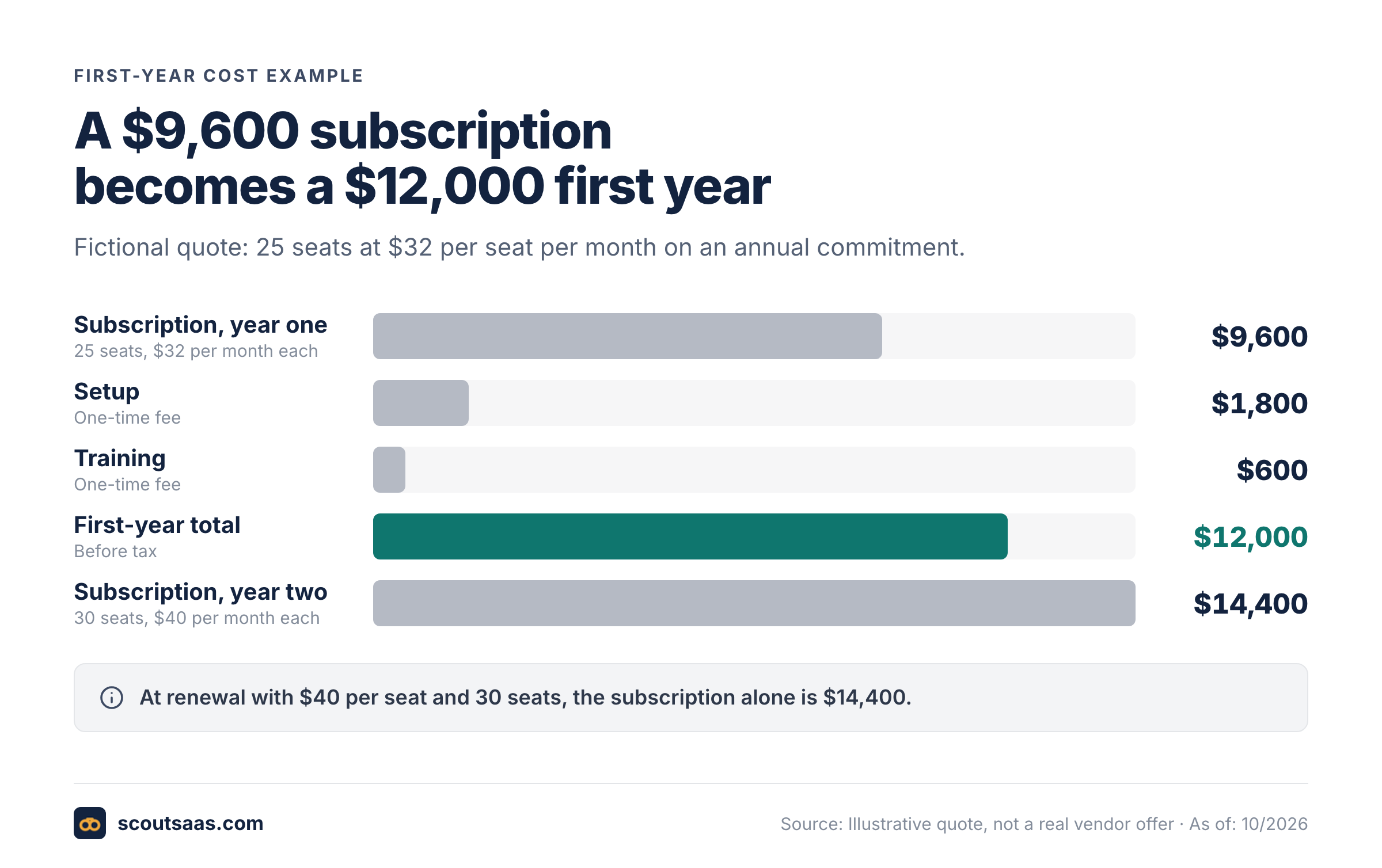
The lesson isn't that one vendor is cheaper. The budget owner needs to see the cost of the actual commitment, not a small per-seat headline. Record which figures are quoted, which are estimates and which are assumptions. Ask the vendor how seats are counted, whether minimums apply and whether unused seats can be reassigned. If the answer isn't in writing, it isn't an answer.
What does a completed SaaS procurement record look like?
Picture a marketing team that's buying a customer-survey platform. The request names a 25-person user group, a target launch date and a business need: collect structured feedback after onboarding. The sponsor sets a $15,000 first-year cap. Procurement compares three vendors on survey logic, CRM integration, SSO and export rights. Security asks whether customer identifiers leave the CRM and where responses are stored. They won't sign off without an answer.
The first vendor demonstrates the workflow, but its proposed plan doesn't include the required SSO feature. The second passes the technical test, but its contract auto-renews with a notice period that legal won't accept. The third meets the requirements, offers acceptable data terms and fits the budget, so that's the one that goes forward. Procurement records the decision and attaches the final quote and approvals. That's a far better audit trail than a chat message saying "Vendor C looks best."
SaaS purchase decision record and vendor scorecard
Copy it into your request form or download it. Grey values are an example. Use one record per purchase and freeze it when the purchase is approved.
- Request ID
- REQ-2026-041
- Business owner and department
- Head of Customer Marketing
- Problem and measurable target
- Collect post-onboarding feedback; 30% survey response rate by Q2What can't the team do today, and how will you know it's fixed?
- Decision date and required start
- 2026-12-01 / 2027-01-15YYYY-MM-DD
- Users and role types
- 25 full users, 3 admins, 0 external
- Data classification and integrations
- Customer email and account ID; CRM sync, SSO
- Shortlisted vendors and exclusion reasons
- Vendor B out: fails the security gate. Vendor C out: auto-renewal terms
- Must-have tests and results
- Branching survey sent to 10 test contacts, passed
- Security reviewer, decision and evidence link
- IT Security, approved, link to SOC 2 review
- Privacy and legal reviewer, decision and evidence link
- Legal, DPA signed, link to redlines
- Quote version, currency, term and seat minimum
- Q-2231 v3, USD, 12 months, 25 seats
- First-year cost and renewal scenario
- $12,000 year one; $14,400 at 30 seats and $40
- Renewal date and notice deadline
- 2028-01-15 / notice by 2027-10-15
- Selected vendor and trade-off rationale
- Vendor A: highest weighted score (4.10/5), meets SSO and export needs within budget
- Approving authority and timestamp
- VP Marketing, 2026-11-20 14:05
- Implementation owner and 30/60/90-day check
- Marketing ops lead; checks on 2027-02-14, 03-16, 04-15
- Exit plan, export and deletion evidence
- CSV export tested; deletion confirmation on termination
- Open exceptions, owners and deadlines
- None
| Vendor | Workflow fit (30%) | Security fit (25%) | Integrations (20%) | Commercial value (15%) | Exit terms (10%) | Weighted score |
|---|---|---|---|---|---|---|
| Vendor A | 4/5 | 5/5 | 4/5 | 3/5 | 4/5 | 4.10/5 |
| Vendor B | 5/5 | 3/5 | 4/5 | 4/5 | 3/5 | 3.95/5 |
- No required security, legal or budget check is open
- The approved quote matches the final order form
- Renewal and notice dates are in the calendar
- An export path has been confirmed with the vendor
Use one frozen decision snapshot when the purchase is approved. If the vendor changes the offer, scope or price afterward, send the changed version back to the relevant reviewers. An approval of an old quote isn't an approval of a new contract.
What are the most common SaaS procurement checklist mistakes?
Starting with a vendor instead of a problem. The team may already own a suitable tool, or the real need may be process design rather than software. Check the existing inventory before you evaluate new vendors.
Confusing a demo with a test. A polished demo follows the vendor's script, and it's not your test. Ask the vendor to run your workflow with your acceptance criteria, including the failure case that matters to you.
Treating SOC 2 or ISO labels as universal guarantees. Evidence has scope, dates and limits. A SOC report for one service doesn't automatically cover every product or subprocessor, and it's often limited to a period. Your security reviewer needs the relevant report and a decision about the remaining risk.
Using old price articles as quotes. Vendors change packaging, minimum seats and contract terms. Save a dated official price page for research, but use a current written quote for the approval record. A web page isn't a quote.
Approving an incomplete contract. A favorable headline price can hide automatic renewals, minimum commitments, data export fees or limits on liability. Legal and finance should review the same final version the signatory receives.
Forgetting the renewal owner. A subscription without an owner usually gets reviewed too late, if it's reviewed at all. Put the cancellation deadline and the evaluation date in a calendar when you buy, because nobody's going to remember them.
Assuming software automates governance by itself. An approval platform can keep requests, quotes and decisions together. It can't make a risk judgment, negotiate an unapproved term or verify a vendor's claim without human review, so don't expect it to.
How can a team manage the checklist without another spreadsheet?
A shared spreadsheet is enough for a small volume of low-risk purchases if it has clear owners, controlled access and links to evidence. As requests grow, it's harder to keep quote versions, review decisions and the final agreement in one place. A dedicated procurement workspace can make those relationships explicit, but the decision still belongs to your people.
 Scout SaaS, the workspace behind this site, supports request intake, vendor suggestions from a software directory, side-by-side quote comparisons, and separate security, legal and budget checks. It also keeps contract context, with file uploads up to 10 MB each, and exports records as CSV or JSON. It doesn't negotiate with suppliers or purchase software on your behalf. The Team plan costs $29 per month per workspace and covers up to 1,000 application records and 500 procurement requests. That price is for the workspace itself, and it's not a benchmark for the vendors you buy through it. Use it when you want a lightweight approval trail rather than an outsourced procurement service.
SaaS procurement checklist FAQ
Who should own the SaaS procurement checklist?
The requester owns the business case, procurement owns comparable offers, IT and security own technical risk, legal owns contract review and finance owns budget approval. A designated sponsor makes the final business decision within company policy. One person may hold several roles at a small company, but the approval record should still show who checked what.
Is a SaaS procurement checklist the same as an RFP?
No. A checklist controls the internal buying decision, and it isn't sent to vendors. An RFP asks vendors to respond to requirements and commercial questions, and it's the vendors who answer it. You can use an RFP for complex or high-value purchases, but you still need internal approvals and a documented final contract review.
Do we need a security review for every SaaS tool?
Apply your organization's risk policy. Even low-risk software needs a basic look at data and access, so there's no free pass. The depth of security evidence should reflect the sensitivity of the information, system privileges and business impact. High-risk purchases need a more detailed review and explicit acceptance of residual risk.
How many vendor quotes should we collect?
Collect enough credible alternatives to understand the market and make a defensible decision. Three quotes can be useful, but there's no universal number that fits every purchase. A sole-source purchase can be justified, and it's fine when an existing integration or compatibility requirement makes alternatives impractical. Record the reason.
What should happen if a vendor changes its price after approval?
Compare the new offer with the approved version. Recalculate the commitment and send material changes back to the relevant budget, security or legal reviewer. Don't reuse an approval that was granted for a different scope or set of terms. It wasn't given for the new offer.
When should we start the renewal review?
Start before the contractual notice deadline, with enough time to check usage, alternatives and renegotiation options. A practical internal default is a reminder at least 60 to 90 days before renewal, but if your notice period's longer, start earlier.
Bottom line
A useful SaaS procurement checklist turns assumptions into evidence before money and data move to a new vendor. Begin with the business need, apply a risk-appropriate review, compare the true commercial commitment and record who approved the final version. Keep renewal and exit requirements in the same record from day one, so nobody has to dig for them later. If a critical check fails, stop the purchase until the risk is resolved or formally accepted under your policy.