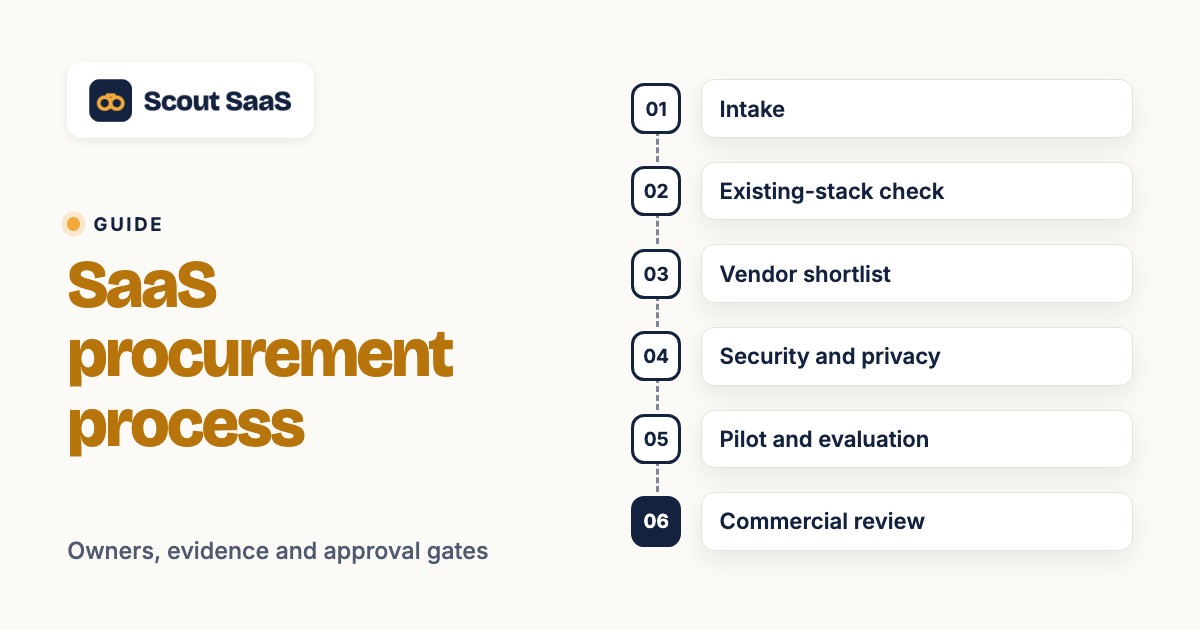
A SaaS procurement process turns a software request into a documented purchase decision, then carries that decision through onboarding and renewal. The important word is process. Someone must be responsible for each handoff, and every approval needs evidence: a business requirement, a comparable quote, a security finding or a signed agreement. Without those records, a team can approve a tool without knowing its real cost, who owns its data or when it renews.
This guide is a practical operating procedure for US businesses buying subscription software. It's deliberately narrower than our SaaS procurement overview, which explains the broader discipline. Here, we'll build a repeatable eight-step workflow, assign accountable owners, and specify what must be true before a purchase can advance. The examples are illustrative, so don't read them as benchmarks or legal advice.
- Start: A requester describes the business need, users, budget and decision deadline.
- Evaluate: Compare existing tools, vendor options and a consistent pilot before choosing.
- Approve: Finance, security and legal provide evidence-backed sign-offs before signature.
- Finish: Record the contract, owner, access plan and renewal notice date.
SaaS procurement process at a glance
A good workflow is easy for a requester to understand and strict where the risks justify it. This sequence works as a starting template. Small teams can combine roles, but they shouldn't confuse combining roles with skipping the decision.
| Step | Primary owner | Required evidence | Gate to proceed |
|---|---|---|---|
| 1. Intake | Requester and department lead | Business case, intended users, budget and deadline | A named business owner accepts the request |
| 2. Existing-stack check | IT or SaaS owner | Inventory search, license and overlap assessment | No suitable existing product meets the need |
| 3. Vendor shortlist | Business owner with procurement | Comparable requirements and candidate list | At least two viable options or a documented exception |
| 4. Security and privacy | Security or IT, with privacy/legal as needed | Data-flow sketch, security responses and remediation notes | Risk owner accepts residual risk |
| 5. Pilot and evaluation | Business owner and end users | Scripted test results and scorecard | Required workflows pass in the quoted edition |
| 6. Commercial review | Finance and procurement | Comparable first-year and renewal costs; redlines | Budget and contract economics are approved |
| 7. Signature and purchase | Authorized signer | Approved order form, DPA if required and final version | The signer has authority and all mandatory approvals |
| 8. Onboarding and renewal | App owner with IT | Access register, contract record, renewal calendar and exit plan | Operational owner confirms handoff complete |
The sequence isn't an argument for eight separate meetings. For a low-risk $30 monthly utility, several checks can happen in one request record. For a product that'll hold customer data or administer employee access, more thorough review is justified. The US NIST supplier due-diligence guide supports taking a risk-informed approach to understanding technology suppliers.
Step 1: Capture the software request before shopping
The requester should describe the problem without naming a favorite vendor as the only acceptable answer. A request such as “buy another CRM” is too vague to evaluate, and it doesn't say what success looks like. “We need a shared view of inbound lead ownership, with Salesforce export and a 15-person team” is a testable requirement. That second version tells procurement what to compare and gives IT a starting point for integration review.
A useful intake form records the requester, department, decision date, business outcome, users, current workaround, required integrations, sensitivity of data, estimated annual budget and an accountable owner. Ask whether the need is temporary, a replacement, a new capability or an expansion of a current subscription. Each answer changes the next step. Replacing a system introduces migration and termination work; expanding an existing contract introduces seat and true-up questions.
The department lead should approve the problem statement before anyone asks for a quote. This isn't final spending authorization. It confirms that the team has a real need and that the request has an owner. If training or configuration in an existing tool can solve the problem, the best procurement outcome may be no new purchase.
Exit artifact: one-page purchase brief. Gate: a named owner accepts the requirement, success criteria and deadline. Failure signal: the only stated requirement is “the team likes Vendor X.”
Step 2: Check existing contracts, licenses and overlap
Search the current application inventory before creating a vendor shortlist. The same function can be hidden under several product names. A sales team may request an outreach tool even though its CRM license already includes sequences. A marketing team may request a new survey platform while a customer-experience tool offers an adequate module. The right question isn't “do we own something similar?” but “can an existing entitlement meet the defined use case at an acceptable incremental cost and risk?”
Record the overlapping applications, contract owners, current seat counts, unused licenses, upcoming renewals and integration constraints. Then ask the internal product owner to demonstrate the required workflow. If it fails, document the failure rather than dismissing the product by reputation. That's what makes the eventual new purchase easy to defend.
A basic inventory spreadsheet can work when you've only got a few contracts. As the stack grows, a SaaS management software directory can help buyers understand the category of tools used for application discovery and lifecycle tracking. A directory comparison isn't a claim that those tools automatically discover your subscriptions; verify each integration and data source before purchase.
Exit artifact: overlap assessment, including the “do nothing” and “expand current license” alternatives. Gate: no existing option passes the must-have criteria at acceptable cost. Failure signal: a new contract is approved while an equivalent paid entitlement sits unused.
Step 3: Build a shortlist against measurable requirements
Create a compact scorecard before contacting vendors. Divide requirements into must-have, should-have and nice-to-have. A must-have should have a clear pass/fail test. “Integrates with Salesforce” isn't specific enough; “creates a Salesforce activity on reply, respects record ownership and retries failed syncs” can be demonstrated. A nice-to-have can influence the final choice, but it shouldn't override a failed security or core-workflow requirement.
Shortlist at least two credible alternatives for an ordinary purchase, unless a documented compatibility, sole-source or urgent exception applies. Two options aren't a universal procurement rule. The purpose is to avoid making a decision from one sales demonstration and to give finance comparable commercial terms. In a regulated or large purchase, the organization's procurement policy may require a formal RFP and more bidders.
Send each vendor the same brief and request the exact edition, included seats, feature gates, integrations, onboarding requirements, support hours and usage limits. Don't ask for a generic “starting at” price when the production workflow needs enterprise SSO or an API that's absent from the base tier. Ask vendors to label assumptions, including any discounts that expire at renewal.
The SaaS buying process guidance from Vendr emphasizes comparing alternatives and identifying the approvals that apply to a purchase. It's vendor-authored advice, so treat it as a practical reference rather than a universal policy.
Exit artifact: requirements matrix and vendor shortlist with reasons for inclusion and exclusion. Gate: each candidate can plausibly meet every must-have. Failure signal: the scorecard is rewritten after a favorite vendor's demo to make that vendor win.
Step 4: Run security, privacy and data-flow review early
Security review should start while vendors are being evaluated, not after the preferred contract is ready for signature. Begin with a data-flow sketch: what data enters the product, who can see it, which systems it connects to, what the vendor can export, and what happens at termination. Classify the sensitivity of the data. A design tool that stores public marketing assets doesn't present the same risk as a product that processes employee records, payment data or customer support transcripts.
Ask the vendor for current security documentation appropriate to the risk. Common evidence includes a SOC 2 report, identity and access controls, encryption details, incident notification terms, subprocessors, data retention rules and a data processing agreement. A badge on a marketing page isn't the same as a current report covering the service and period you will use. Security should review the evidence, not just tick a badge box.
Check how administrators are created and removed. Name who's allowed to add them and who's responsible for removing them. If your organization requires SAML SSO, SCIM provisioning, audit logs or region-specific hosting, verify that the quoted plan includes those capabilities. The presence of an enterprise feature on a vendor website doesn't prove it's available on a lower tier. For integrations, request the OAuth scopes or API permissions and determine whether the connection can access more data than it needs.
The final NIST SP 1326 due-diligence quick-start guide, published in July 2026, describes foundational supplier research for ICT acquisition. Use it to inform a risk-based questionnaire, but don't treat it as a substitute for your organization's own security decision. If a risk can't be mitigated, name the executive who may accept it. A silent omission isn't risk acceptance, and it won't hold up in an audit.
Exit artifact: vendor risk record, data-flow sketch and written remediation or acceptance decision. Gate: security and privacy reviewers have approved the proposed deployment or documented an authorized exception. Failure signal: the contract is signed before anyone knows what customer data the tool will store.
Step 5: Test the real workflow, not the vendor's best demo
A polished demo proves the vendor can present its software. It doesn't prove your team can run the workflow with your permissions, data model and integrations. Give finalists a short, scripted pilot using representative, non-sensitive sample data where possible. Use the same scenario for each product so the evaluation is fair.
For a sales engagement purchase, the script might be: import ten sample contacts, assign owners, enroll them in a sequence, simulate a reply and an opt-out, sync the activity to the CRM, change ownership, and recover from an API error. For contract management software, test document import, renewal dates, a change of owner, approval history, export and cancellation notice reminders. The exact script changes with the category, but every task should trace back to a requirement.
Include the people who'll actually administer and use the system. Ask an end user to complete a routine task without vendor guidance and ask an administrator to configure permissions. Don't help either of them; you're measuring the product, not the demo. Capture pass/fail results, time spent, unexpected steps and limitations. If a vendor says a feature is “on the roadmap,” you shouldn't count it; record it as unavailable for this purchase unless the contract specifically and enforceably addresses delivery.
Don't award a numeric “best” score from a sales deck alone. A transparent scorecard can use weights selected before the pilot. For example, functional fit might matter more than a minor discount when the tool is mission-critical. Treat these as internal decision weights. They aren't independent product ratings or search rankings.
Exit artifact: pilot results and a scored requirements matrix. Gate: every must-have passes in the quoted edition or has an approved exception. Failure signal: the team purchases a feature that only appeared in the vendor's demonstration environment.
Step 6: Compare first-year cost, renewal cost and contract terms
Subscription quotes often use different units, and that's what makes them hard to compare. One vendor charges per user; another bills by workspace; a third adds credits, API calls or contact volume. Normalize every proposal to the same business scenario before comparing prices. Include the seats actually needed, billing frequency, implementation, required add-ons, data migration, training and support. Then separately model the renewal year without one-time fees or temporary discounts.
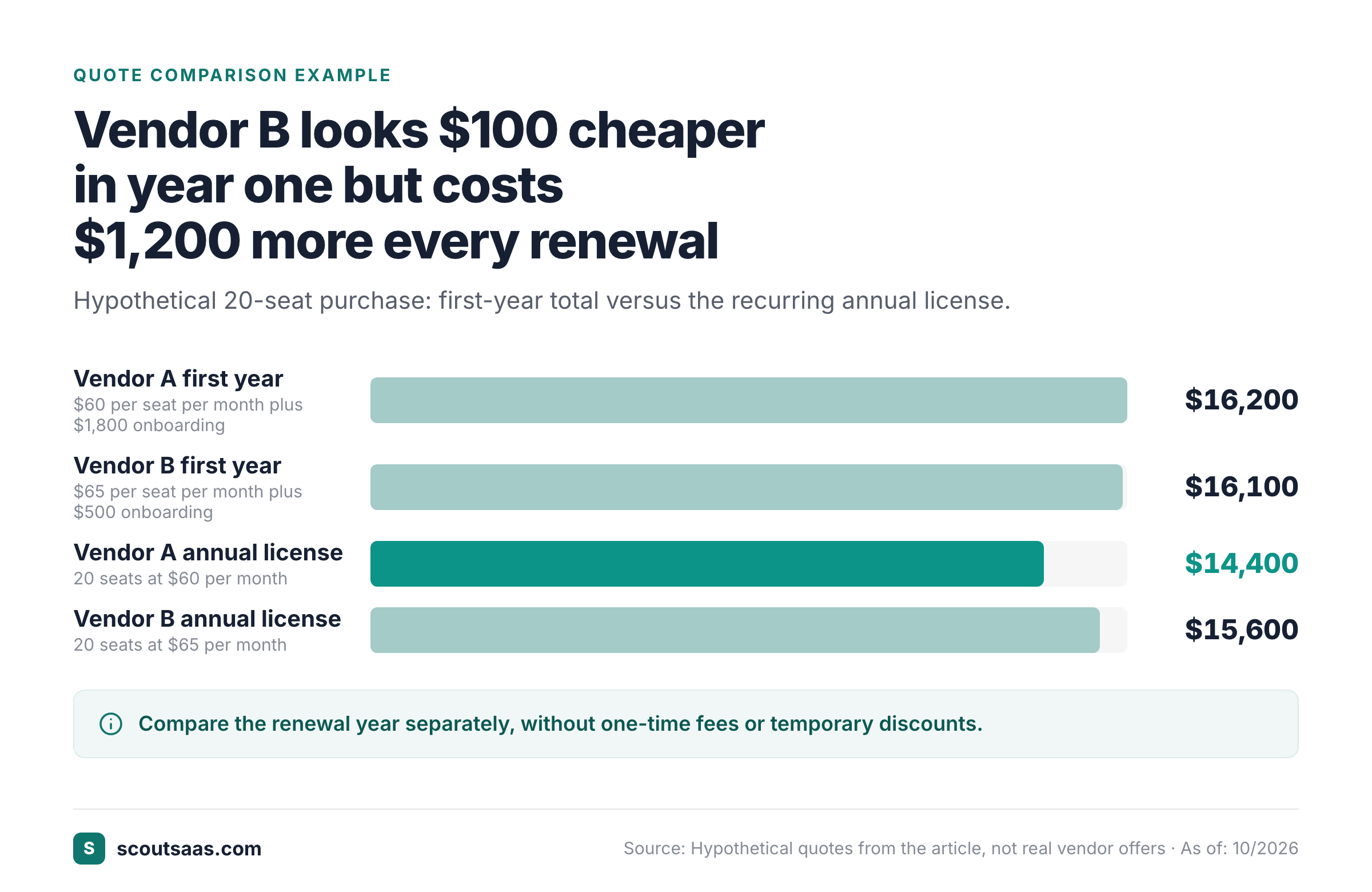
Consider a fictional 20-seat purchase. Vendor A quotes $60 per seat per month plus a $1,800 onboarding fee. Its illustrative first-year cost is 20 × $60 × 12 + $1,800 = $16,200. Vendor B quotes $65 per seat per month plus $500 onboarding. Its first-year cost is 20 × $65 × 12 + $500 = $16,100. B is $100 cheaper in year one, but before changes in pricing or usage, its recurring annual license is $15,600 versus A's $14,400. This simple comparison demonstrates why a first-year total isn't enough. These numbers are hypothetical.
Request a line-item order form with currency, taxes, minimum seats, billing cadence, overage rates, usage definitions, support terms, price escalation, auto-renewal, notice periods, data export and deletion obligations. Confirm what happens if users are removed during the term. A “cancel anytime” statement doesn't necessarily describe the financial obligation under a signed annual agreement. Legal should review the actual governing documents, not a sales email summary. If it isn't in the order form or the terms, it isn't a commitment.
Where an SLA matters, define the service and remedy clearly. An uptime percentage is useful only with the measurement window, exclusions, reporting process and credits or termination rights. Similarly, a DPA should cover the relevant processing relationship and transfer terms. Don't assume a standard document meets every company's requirements.
Exit artifact: comparable total-cost worksheet and redlined contract. Gate: finance approves the realistic spend and legal approves material terms. Failure signal: a team signs a “discounted” annual contract without documenting renewal uplift or minimum seats.
Step 7: Obtain explicit approvals and sign the final version
Approvals should be visible and attributable, so nobody's guessing later. A practical purchase record contains the requester's business approval, finance budget approval, security finding, legal sign-off where required, and the identity of the authorized signer. These roles can overlap in a small business, but the record should still say who made each decision. A chat reaction isn't a durable substitute for the final approved version of the contract.
A common approach is to route department, finance, security and legal approvals according to risk and spend. Vendr describes these four functions in its cross-functional buying framework. Your organization should define its own thresholds and exceptions; the framework is a reference, not a mandatory US standard. Low-risk renewals may need fewer checks than a new system with broad production access.
Version control is essential, and it's easy to neglect. It's also where many teams slip. If the vendor changes the seat count, term, data processing clause or price after approval, the relevant reviewers should see the revised document. An approval of quote A shouldn't automatically approve quote B. Save the final signed order form and governing documents together with the purchase record, and record the exact start and end dates.
If your team needs a focused place to record requests, compare quotes and capture approvals, review the SaaS procurement software directory for product options. The directory helps with discovery; actual approvals and contract controls depend on the tool and configuration you choose.
Exit artifact: approval trail and executed agreement. Gate: the authorized signer signs only the reviewed final version. Failure signal: legal approved one set of terms but procurement signed a later revision without re-review.
Step 8: Hand off ownership, access and renewal work
The procurement process isn't finished when the card is charged. IT or the application owner must configure identity, roles and integrations, while the business owner verifies that users can perform the workflow. Don't lose track of the paperwork. Store the contract, vendor contact, service owner, invoice owner, renewal date, cancellation notice window and export procedure in an accessible system. Avoid storing credentials in the procurement record.
Define a 30-day adoption check. The intended users should be active, the integrations reliable, and the original problem solved. The metric should be tied to the business case, not simply “licenses assigned.” If the vendor's promised a migration, assign someone to confirm data completeness and permissions before retiring the old product. Keep a rollback or export path until the transition is stable.
Set renewal reminders from the notice deadline, not just the contract end date. A contract ending on December 31 with a 60-day cancellation requirement needs action before the end of October. Many procurement teams start evaluation earlier so they can compare usage, alternatives and negotiation options. Vendr's buying-process guide recommends starting renewal evaluation 90 to 120 days ahead as an operational practice, not a contractual rule.
At renewal, repeat the business-case and risk questions. Don't assume the initial purchase remains appropriate. Check actual use, unused seats, product changes, new data flows and any contract amendments. If the tool is no longer needed, follow the agreed exit procedure and obtain confirmation of data export and deletion where appropriate.
Exit artifact: live owner, access register, contract repository, adoption check and renewal schedule. Gate: operations accepts ownership and the first renewal checkpoint is scheduled. Failure signal: nobody knows who can cancel the subscription or where its data can be exported.
How to adapt the process for a small team or enterprise
A five-person startup may not need a procurement department. The founder or department lead can own the request, finance decision and signature while an IT adviser reviews security. A shared intake form, a spreadsheet of contracts and a calendar reminder can provide a workable audit trail. Keep the same core gates: purpose, alternatives, data risk, real cost, approval and renewal ownership.
A larger organization will usually separate duties. Procurement coordinates sourcing; finance checks committed spend; security reviews vendor risk; legal negotiates terms; IT administers access; and the business owner confirms the product delivers value. The goal isn't maximum paperwork. It's to ensure that the right reviewer can stop a risky purchase before it becomes difficult to unwind.
Use risk-based routing. Don't send every small renewal through the same heavyweight process as a new system containing sensitive personal data. Define thresholds in a written policy, and revisit them when incidents or spend patterns show the controls are too weak or too burdensome.
A reusable SaaS purchase decision record
Copy the following fields into your intake form, procurement system or shared tracker. It's a short list on purpose. Keep it concise enough that people will actually complete it.
| Field | Example or instruction |
|---|---|
| Request ID and owner | Unique ID, named business owner and department |
| Need and outcome | One sentence on the problem and measurable success |
| Current tools checked | Existing products reviewed and why they did not qualify |
| Candidate vendors | Shortlist, edition, proposed users and pilot outcome |
| Commercial comparison | First-year total, renewal total, currency and assumptions |
| Security review | Data categories, access, DPA, evidence and risk decision |
| Legal review | MSA, order form, notice period, SLA and exceptions |
| Approvals | Approver, role, decision, timestamp and document version |
| Contract owner | Internal owner and vendor contact |
| Renewal checkpoint | Notice deadline, evaluation start date and exit plan |
The decision record should also say why the selected vendor won. “Lowest first-year price” may be sufficient for a low-risk utility, but a critical workflow may justify paying more for an integration that passed the pilot or for contractual protections. Record the trade-off so future renewal owners don't have to reconstruct the decision from old email threads.
Common SaaS procurement process mistakes
Buying before defining success. A vendor can be impressive without solving the team's problem. Define the task and acceptance test first. Otherwise, implementation turns into an expensive discovery process.
Skipping the existing-stack check. A new subscription may duplicate a paid feature in a current tool. An inventory review doesn't always eliminate the need, but it gives the buyer a real alternative and a baseline cost.
Using entry pricing as the decision price. A vendor's headline plan may omit the necessary users, credits, integration, SSO or reporting. Compare the exact edition that passed the pilot, not the cheapest plan on a pricing page.
Leaving security until the end. Late review can force a rushed exception or an abandoned deal after weeks of evaluation. Start risk questions when the shortlist is created and record what evidence is still missing.
Treating signature as the finish line. Without an owner, an access plan and a renewal reminder, the team can't stay in control over the subscription. An operational handoff is a required deliverable, and it isn't an optional courtesy.
SaaS procurement process FAQ
What are the main steps in the SaaS procurement process?
Capture the need, check existing software, shortlist vendors, review security, run a pilot, compare cost and terms, approve and sign, then hand off ownership and renewals.
Who owns a SaaS procurement process?
A named business owner owns the need. Procurement may coordinate sourcing, while finance, security, legal and IT own their respective approval or implementation decisions.
How long should SaaS procurement take?
There's no universal duration. A low-risk tool may move quickly, while a sensitive or complex system needs more review. Set a decision date and track each gate rather than assuming a standard timeline.
Do all SaaS purchases need an RFP?
No. Use the organization's policy and the risk and value of the purchase. A small, well-documented comparison can be enough for a routine purchase; large or regulated purchases may require a formal RFP.
What documents should be retained?
Keep the business brief, comparison, pilot results, security and legal decisions, final signed terms, cost assumptions, contract owner and renewal notice date.
Build a process that survives the next renewal
The best SaaS procurement process is the one your team can repeat without relying on one employee's memory. It should begin with a clear need, compare alternatives on the same basis, protect the business through risk and contract review, and end with a named owner and a renewal date. The artifacts can be simple. The decisions can't be vague.
For the broader concepts behind the workflow, read our SaaS procurement guide. When you're ready to evaluate products for managing purchase requests and approvals, use the SaaS procurement software directory.